
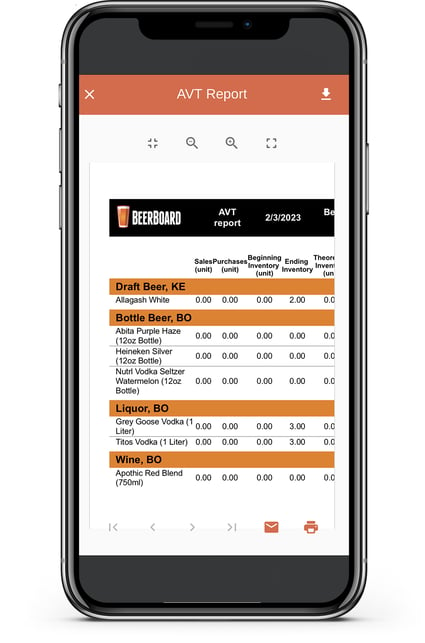
The Actual vs Theoretical (AvT) report is generated in PDF format after each manual inventory process is completed. The AvT report shows a comparison of the actual quantities on hand, and theoretical inventory.
To generate this report, the user must conduct a Manual Inventory/Inventory Audit.

Actual inventory is based on the date when physical inventory counts were completed, which generates the AvT report. Theoretical inventory is based on sales and purchases that happen in-between physical inventory counts. This report can only be found in the Inventory Records section under the Completed option. Use the arrows at the bottom to scroll through the full report in the app. This report can also be emailed, downloaded, or printed from the AVT page.
Note:
- If a product is removed from a shelf in the Manual Inventory section, it will not change the data in previous reports.
- When receiving a purchase by using either the desktop version of SmartBar or the Invoice Capture feature on the mobile app, this will update the inventory in the first instance in the shelf inventory.
- After an order is received, the inventory in your shelves will need to be updated to match the actual bars and shelves where those products are physically placed, or moved to. This can be done without starting a new inventory by finding the Bar and Shelf where this inventory was physically placed, add the quantities, and save.
- Any manual adjustments made to products is shown under the Manual Adjustment column in the Perpetual Inventory in SmartOrders (desktop or mobile).
How to save a copy of the AvT Report:
Once you complete capturing your inventory in the mobile app, an AvT report is automatically generated and can be found under the Inventories tab, then under the Completed section
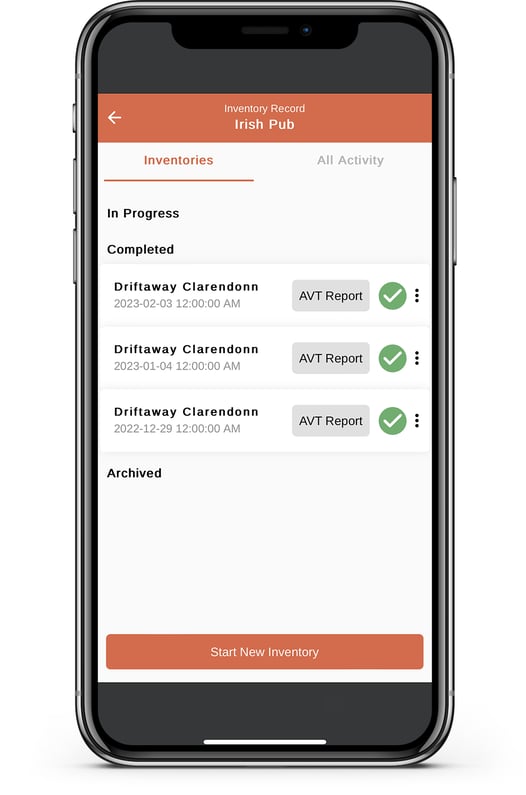
- This report can be viewed in app - pagination can be found at the bottom
- Click the arrow in the upper right-hand corner to download the report to your device
- Click the envelope icon to email a report to yourself and others, if needed
- Click the printer icon to send this report to printers that are connected to your mobile device
Sample Report


Hoặc